

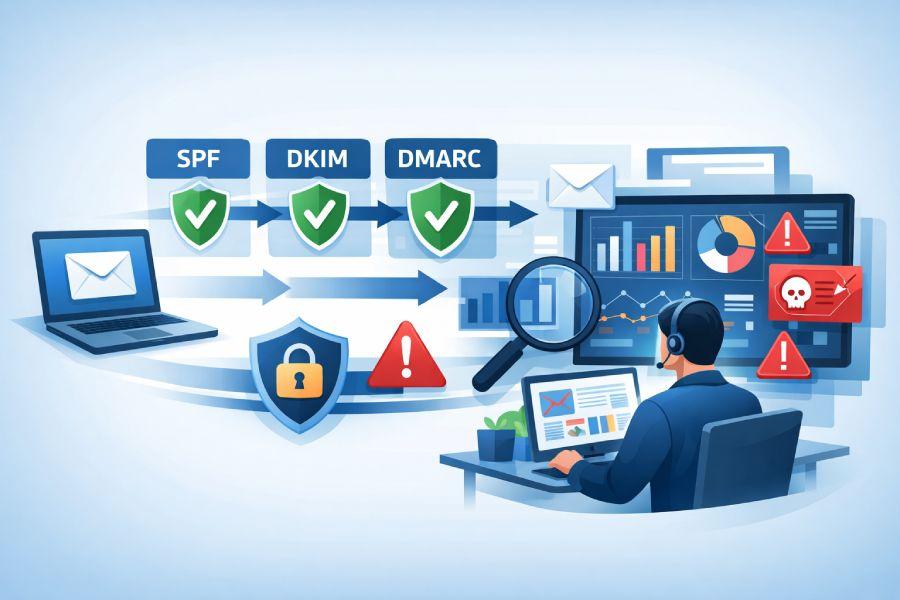
Understanding DMARC: Purpose and Benefits
Domain-based Message Authentication, Reporting & Conformance (DMARC) is a crucial protocol for administrators managing business email protection. As email remains a primary vector for phishing attacks, spoofed emails, and other types of email abuse, DMARC sits at the core of modern email security and anti-spoofing efforts. By enabling domain authentication and policy enforcement, DMARC empowers organizations to secure their communications, defend their brands, and maintain the integrity of their domain portfolio.
The principal purpose of DMARC is to allow domain owners to specify authentication mechanisms that receiving mail servers can use to check incoming messages. By doing so, DMARC helps prevent fraudulent emails from reaching recipients, offering robust phishing protection and insight and control over how emails sent from legitimate sources—or malicious actors pretending to be—are processed.
Beyond baseline security, DMARC reporting and monitoring brings additional benefits. Administrators can routinely monitor messages, detect email misconfigurations, and gather granular report analysis data, all of which feed into advanced policy management and proactive threat detection strategies. DMARC monitoring further supports multi-domain management for organizations leveraging a complex network of sending domains or different service providers.
How DMARC Works: An Overview of Protocols Involved
To fully appreciate the value of DMARC reporting, it’s important to understand its place within the broader email authentication ecosystem. DMARC builds on two foundational protocols: Sender Policy Framework (SPF) and DomainKeys Identified Mail (DKIM).
SPF management involves specifying which mail servers are authorized to send messages on behalf of a domain via DNS-published SPF records. An SPF lookup tool can validate these configurations and help enforce the DNS lookup limit—important for organizations with complex sender infrastructures. SPF flattening and macro support are modern techniques to optimize these records for maintainability and compliance with platform scalability requirements.
DKIM adds a cryptographic signature to outbound emails, allowing recipient servers to verify message integrity and that messages were authorized by the domain owner. Tools like DKIM checkers and BMP lookup tools can assist in ongoing DKIM and BIMI compliance assessments.
DMARC integrates these checks by instructing receiving Mail Transfer Agents (MTAs), such as those operated by Google, Microsoft, Yahoo!, and other major brands, how to handle messages that fail authentication. Administrators can configure different levels of enforcement—none, quarantine, or reject—depending on their organization’s risk tolerance and maturity of email validation systems.
For advanced deployments, integrating complementary hosted email security layers such as MTA-STS (Mail Transfer Agent—Strict Transport Security), MTA-STS Records, TLS-RPT (SMTP TLS reporting), and custom SSL certificates further harden mail flows and increase visibility through enterprise-grade reporting and dashboard solutions.
Types of DMARC Reports: Aggregate vs. Forensic

Aggregate Reports
Aggregate reports are the most common format of DMARC reporting. They summarize email authentication activity for a domain, including pass/fail counts for SPF and DKIM, categorized by sources and receiving ISPs like PayPal, Microsoft, and Stripe. These reports are delivered in XML format, typically daily, and contain valuable data for DMARC monitoring and domain management—uncovering trends, reviewing the volume of potentially spoofed emails, and assisting in business email protection.
Aggregate reports feed dashboards that facilitate report filtering, customer configuration, and policy management across a large domain portfolio. Service providers (MSPs) and organizations handling multi-domain management frequently integrate aggregate reports into automated workflows via REST API or using a DMARC checker tool, sometimes facilitated by enterprise-grade platforms like Valimail, EasyDMARC, Fraudmarc, PowerDMARC, and DMARCReport.
Forensic Reports
Forensic reports (also known as failure or “RUF” reports) provide granular, real-time notifications of authentication failures. This includes detailed samples of failed messages that may represent fraudulent emails, attempted spoofing, or legitimate emails caught as false positives. Forensic reporting is invaluable for threat detection and providing immediate insight and control, although privacy and volume considerations must be managed carefully.
Centralized platforms such as DMARCLY, PowerDMARC, and DMARCReport enable streamlined analysis of forensic reports and support reporting URL customization, white label dashboards, and flexible notification mechanisms for both internal teams and service provider partners.
Key Components of a DMARC Report
Administrators tasked with DMARC monitoring and email security need to understand the core sections of a DMARC report to ensure accurate report analysis and informed policy enforcement. A typical DMARC report—whether aggregate or forensic—contains:
- Source IP: The IP address of the email sender, crucial for identifying legitimate vs. fraudulent emails.
- Envelope From & Header From Domains: Used to validate domain authentication alignment between SPF/DKIM and the visible source address.
- SPF and DKIM results: Whether the email passed or failed each protocol’s checks, enhancing advanced policy management and insight into potential email misconfigurations.
- Disposition: The action (none, quarantine, reject) taken by the receiving server, reflecting current policy enforcement.
- SPF/DKIM Alignment: Indicates if the sender’s domain matches in the headers and authentication checks.
- Policy Evaluated: The actual DMARC policy applied, supporting audit activities and brand protection.
- Reporting Organization: Information about the receiver (e.g., Google, Microsoft), making source tracking straightforward and supporting industry standards compliance.
Enterprise solutions and reporting services, such as those from DMARCReport, DuoCircle LLC, DMARCLY, and Valimail, enhance these native report formats with custom reporting URLs, report filtering, insight-rich dashboards, and API documentation for seamless integration.
How to Access and Receive DMARC Reports
Approaches to DMARC Monitoring:
1. Direct-to-Inbox Monitoring
Small organizations or those managing a limited domain portfolio may choose to collect aggregate reports directly via email. Free tools and scripts—including the DMARC report solution—offer simple parsing and visualization.
2. Aggregator and Platform Integration
For business email protection at scale, or when managing hosted email security for clients, administrators leverage platforms such as DMARCReport, EasyDMARC, Fraudmarc, or Site24x7, which provide advanced option sets including:
- Automated report parsing and visualization dashboards
- Policy management tools with advanced reporting and report filtering capabilities
- Platform scalability to accommodate multi-domain management and MSP Partner Program integrations
- REST API endpoints and comprehensive API documentation for integrating DMARC monitoring into automated workflows
- Features like custom SSL certificates, TLS-RPT lookup tool usage, DMARC lookup tool, and customer configuration enhancement
3. Best Practices
To maximize DMARC monitoring effectiveness, administrators should:
- Routinely use SPF lookup tools, DKIM checkers, and BIMI lookup tools to validate SPF management, DKIM alignment, and visual brand authentication (BIMI compliance).
- Ensure support for both macro support and DNS lookup limit handling to maintain SPF record integrity in advanced deployments.
- Consider MTA-STS adoption for enhanced email security and MTA-STS Records for ongoing monitoring.
- Use reporting URL customization for enterprise-grade deployments where reporting needs to be tailored by client, department, or MSP.
- Book a demo with leading providers before committing to a solution, ensuring features like automated workflows, white label options, and granular policy management align with business needs.
For administrators concerned with brand protection, anti-spoofing, and policy enforcement in modern digital communication, leveraging DMARC, SPF, DKIM, and comprehensive DMARC monitoring with detailed DMARC reporting is now foundational. The ecosystem continues to mature with competitive providers like PayPal, Europe Leader, and Stripe elevating industry standards compliance and pushing advancements in threat detection and email abuse prevention for organizations worldwide.
Interpreting DMARC Report Data: Metrics and Fields

1. Key Fields in Aggregate Reports
Aggregate DMARC reporting typically includes the following fields:
- Source IP: The IP address that sent the email, helping to identify potential sources of spoofed emails or fraudulent emails.
- Disposition: Indicates the policy action taken (none, quarantine, or reject) for each message, facilitating policy enforcement and anti-spoofing efforts.
- SPF and DKIM Results: Outcome of SPF management and DKIM validation for each message; critical for ongoing email authentication.
- Count: The number of emails from each source, vital for threat detection and volume analysis.
Other important metrics include organizational domain, header from, envelope from, and SPF records involved—helpful for monitoring email misconfigurations or identifying domains affected by abusive activity.
2. Fields in Forensic Reports
Forensic reports, though less common due to privacy concerns, provide granular details such as:
- Original Message Headers: For in-depth analysis of authentication failures.
- Failure Reason: Describes why a message failed DMARC, useful for pinpointing issues or false positives.
- Attachments: Occasionally included, especially if the failed message is part of a targeted phishing attempt.
Understanding these metrics is vital for efficient report analysis and for gaining actionable insight and control through the dashboard or automated workflows.
Common Issues Identified by DMARC Reports
Authentication Failures and Misconfigurations
Frequent failures often indicate problems with SPF records or DKIM keys. For example, exceeding the DNS lookup limit during SPF evaluation, neglecting SPF flattening, or incorrect macro support can lead to messages being marked as unauthorized—potentially resulting in deliverability issues and false positives.
Spoofed and Fraudulent Emails
DMARC reports expose spoofed emails by flagging unauthorized third-party senders attempting to impersonate domain owners, a key vector for fraudulent emails and email abuse. For industries like finance or technology, such as PayPal, Microsoft, or Google, maintaining vigilant phishing protection is paramount.
Multi-domain Management Challenges
Organizations with large domain portfolios—such as MSP or service providers—often struggle with multi-domain management, tracking authentication status, and implementing consistent policy management across domains. Aggregate reports highlight domains lacking compliance or facing persistent threats.
Best Practices for Analyzing and Acting on DMARC Data
1. Establish Routine Monitoring Workflows
Consistent DMARC monitoring, using tools like DMARCReport or dashboards from services such as DuoCircle LLC and EasyDMARC, ensures rapid detection of abnormalities. Automated workflows and REST API integrations with custom reporting URL configurations enable efficient review and coordinated response.
a. Prioritize Threats with Report Filtering
Enterprise-grade solutions offer report filtering and analysis, making it easier to focus on high-priority threats, such as spikes in spoofed emails or failures from important business partners. Look for detailed filtering within forensic and aggregate reports for sharper threat detection.
2. Validate SPF and DKIM Configuration
Regular SPF lookup tool and DMARC checker tool usage ensures proper SPF management. Monitor SPF records for DNS lookup limit violations and enable SPF flattening to minimize the chance of false positives. For DKIM, rotate keys periodically and confirm alignment to organizational domains for robust domain authentication and anti-spoofing.
3. Enforce and Adjust Policies Based on Insights
Review report analysis to identify trends and adjust policy management accordingly. Escalate from “none” to “quarantine” or “reject” as your email ecosystem matures. Use advanced policy management features offered by platforms like PowerDMARC, Valimail, and DMARCLY to set granularity and automate change deployment.
Tools and Solutions for DMARC Report Management
Sophisticated DMARC reporting platforms streamline the process of monitoring, analyzing, and acting on DMARC data.
Features of Leading DMARC Management Solutions
Modern platforms, including DMARCreport, integrate the following functions:
- Automated Aggregation and Analysis: Collects aggregate reports and forensic reports from multiple domains for unified report analysis and dashboard visualization.
Multi-Domain Management: Addresses the need for scalable domain management and customer configuration, particularly for MSP Partner Programs and service providers. - SPF/DKIM/BIMI Lookup Tools: Built-in SPF lookup tool, DMARC lookup tool, and BIMI lookup tool offer immediate validation and troubleshooting.
- Hosted Email Security and MTA-STS Integration: Streamlines MTA-STS Records deployment for business email protection, allows custom SSL certificates, and supports TLS-RPT with SMTP TLS reporting for encrypted transport assurance.
- Enhanced Automation and API Integration: Exposes REST API endpoints with robust API documentation for integrating reporting into custom workflows and business intelligence pipelines.
- Whitelabel and Reporting URL Customization: Brands protection through white label options and custom reporting URL functionality for enterprise clients.
Platforms such as DMARCReport, DMARCLY, EasyDMARC, and others are regularly reviewed on Capterra and recognized by industry standards compliance initiatives. They offer reporting, insight and control, and simple “book a demo” options for new clients.
Key Takeaways
- Ongoing DMARC monitoring helps detect spoofing and phishing
- Aggregate and forensic reports improve threat detection and reduce errors.
- Advanced DMARC tools support multi-domain control and automation.
- Standards like MTA-STS, TLS-RPT, BIMI enhance enterprise email security.
- Regular SPF, DKIM checks ensure strong anti-spoofing protection.